
Shed business owners face a crucial decision between ShedSuite and ShedPro that could affect their profits by a lot. The online retail market will reach $1.28 trillion by 2028, growing at almost 10 percent yearly. 3D eCommerce is set to grow twice as fast over the next eight years. This makes shed software technology a must-have for businesses looking ahead.
Shed companies can see amazing results with the right 3D configuration platform. Most businesses achieve a 145 percent return-on-investment in their first year and boost sales by 50 percent. ShedSuite, ShedPro, and TheShedApp each bring strong features to the table with their own advantages and limits. A free, accessible design experience for potential shed buyers can boost your sales by a lot.
Business owners who use these platforms shared their real-life experiences with us. This helps you pick the best option for your company. Our comparison breaks down how these tools match up against each other. You’ll have everything you need to make a choice that stimulates your shed business’s growth.
Overview of ShedSuite, ShedPro, and TheShedApp
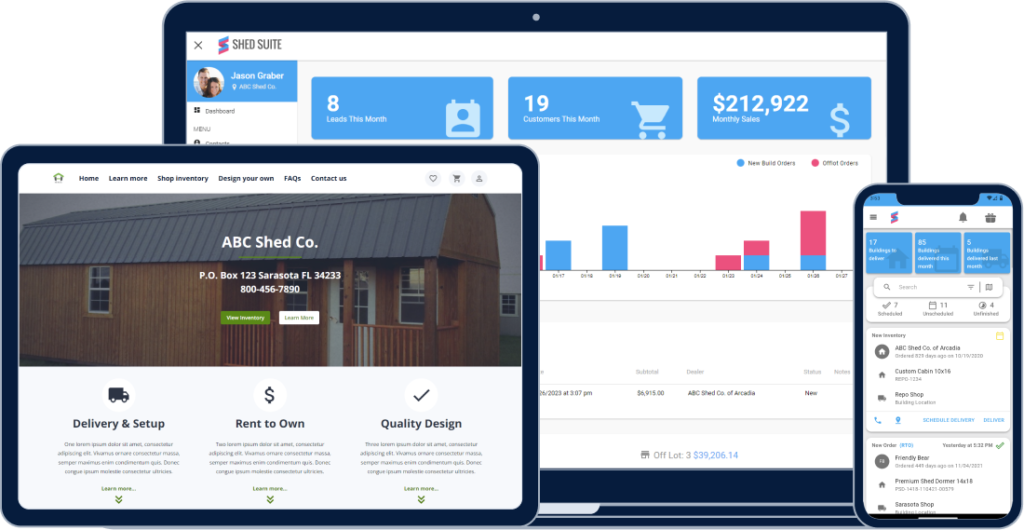
Modern shed business software goes beyond basic configuration tools to provide detailed business management capabilities. Each platform we compared takes its own approach to tackle common challenges in unique ways.
What Each Platform Is Designed For
ShedSuite works as a complete shed business assistant from lead generation to order delivery. The software started as a specialized tool for shed businesses and now combines many tools in one ecosystem. The platform helps optimize operations through automated workflows. It eliminates paper-based processes and tracks inventory live.
ShedPro started as a marketing agency before launching their dedicated shed business platform in 2020. The company has 14 years of digital marketing experience and switched to shed industry software after spotting gaps in available tools. The platform brings together four connected hubs: Marketing, Design Studio, Sales, and Operations. These hubs make shed businesses easier to manage.
TheShedApp competes mainly in the 3D design space, though fewer sources mention it directly. The platform matches others with its strong visualization features but might be complex to use.
These platforms stand out from regular business software because they were built specifically for shed, carport, and garage industries. They understand the unique workflows these businesses need.
Target Users and Business Sizes
ShedSuite helps shed businesses of all sizes with features you can customize to fit your needs. The platform creates role-specific dashboards for everyone from delivery drivers to office administrators. This makes ShedSuite perfect for businesses with specialized teams and clear responsibilities.
ShedPro works with customers ranging from small dealerships to large manufacturers. Companies using their platform have seen sales increases of 30-40%. The platform excels at helping shed companies build or improve their online presence. It provides website development and digital advertising along with operational tools.
TheShedApp shines with its powerful 3D configuration features. The interface takes time to learn, which makes it better suited for businesses that have technical skills or training resources.
ShedSuite and ShedPro let you customize their platforms. ShedPro adapts fully to your business needs, while ShedSuite offers flexible dealer dashboards and websites. Growing businesses can benefit from this adaptability as their needs change.
All three platforms include 3D configurator features with different designs and interfaces. Shed businesses moving away from paper systems or expanding their digital presence can choose the platform that best fits their priorities and structure.
3D Design and Configurator Capabilities
3D visualization has become a vital factor for shed businesses that want to excel in a competitive market. Each platform in our comparison helps customers see their dream structures before buying them in its own unique way.
Visual Customization: IdeaRoom vs ShedPro vs The Shed App
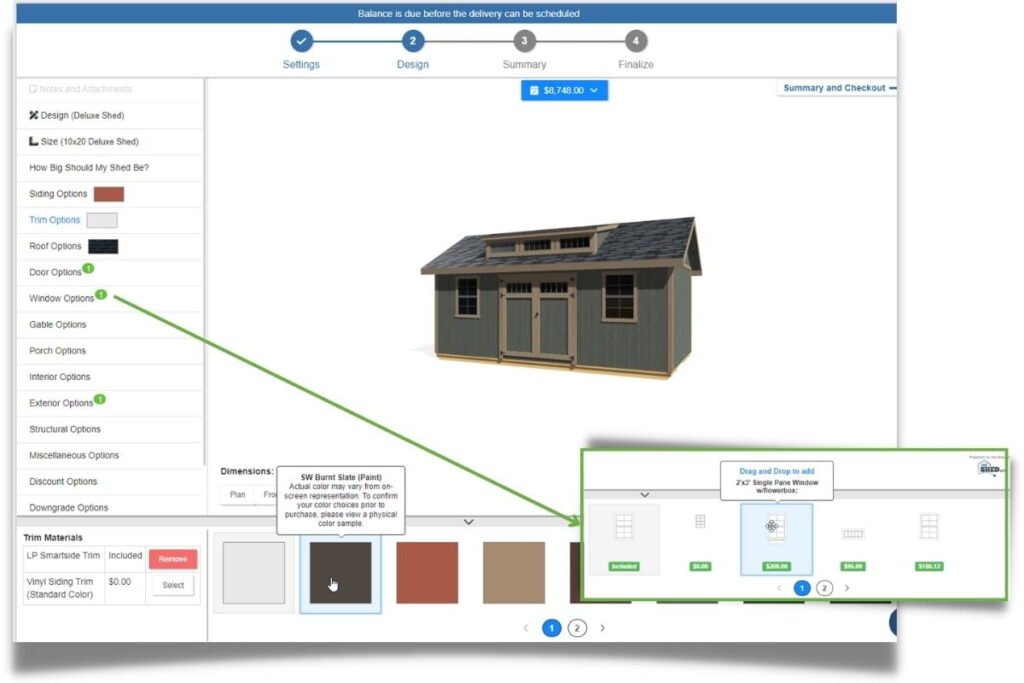
ShedSuite utilizes IdeaRoom 3D Builder as its visualization technology. Customers can design custom sheds or pick from pre-configured models. This integration gets more sales conversions and involves customers better. The user-friendly platform lets customers see their designs from many angles.
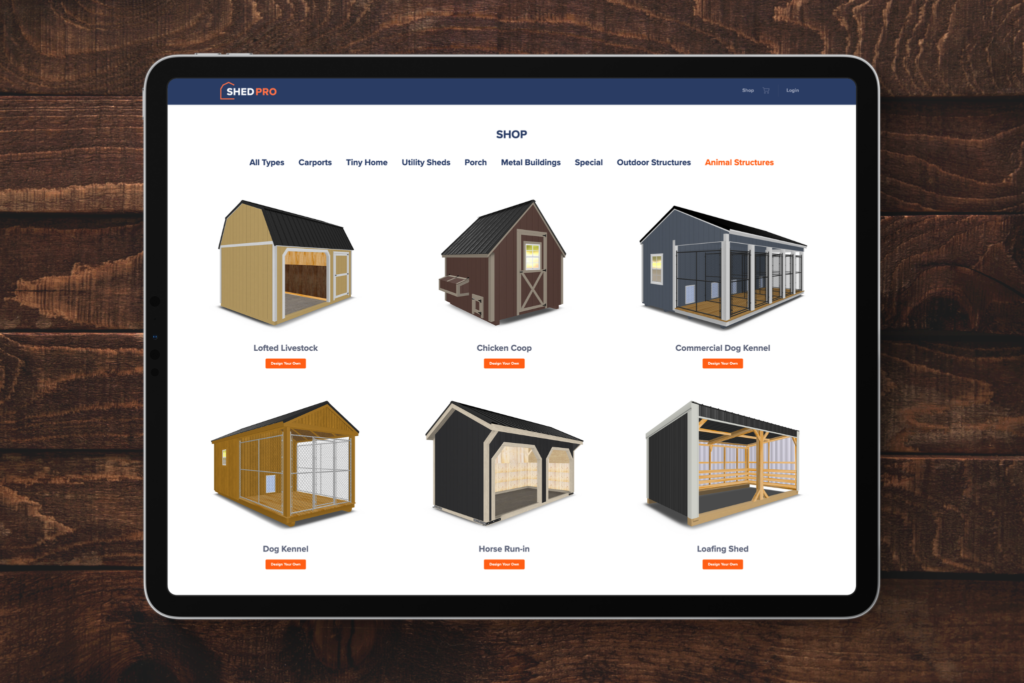
ShedPro’s Design Studio shows detailed and realistic 3D models of sheds, tiny homes, and carports—most detailed in the industry. Changes to styles, colors, and features appear immediately on their user-friendly interface. Buyers find the interactive design approach makes customization easy.
TheShedApp has strong 3D rendering features that show both interior and exterior views. Users control their data with detailed customization options for materials and colors. Customers see exactly what they’re buying, which reduces uncertainty.
Interactive experiences get twice as many conversions as passive content like static brochures or photo galleries. All three platforms understand this advantage as they compete to create the most engaging visualization tools.
Dynamic Pricing and Quote Generation
Price updates happen immediately on these platforms. Pricing estimates adjust automatically as customers modify designs. This streamlines the sales process and removes guesswork.
ShedPro reports businesses using their configurator see twice as many leads and up to 60% success rates. The system gets customer contact details when designs are saved and sends automated follow-up emails to keep prospects interested.
TheShedApp shows pricing estimates next to its 3D renderings and lets businesses update all pricing information easily. Quotes stay accurate without manual recalculation.
Buyers stay on sites up to 50% longer with interactive content compared to static content. They’re less likely to visit competitor websites. HubSpot data shows interactive content can double conversion rates.
Augmented Reality and Save/Share Features
AR features have changed how customers visualize sheds.
ShedPro lets customers see their designed shed in their actual garden or property through AR. Customers can scan a QR code or click a link on their smartphone after customizing a shed in the 3D configurator. This places a virtual shed in their real environment.
Each platform handles sharing differently. TheShedApp lets users share specific views with coworkers who have proper permissions. Most shed configuration tools provide unique links to share designs with manufacturers or others for feedback.
Saving designs matters across all platforms. Customers can save their shed designs by providing an email address. They get a link to revisit and adjust their design anytime. This feature creates valuable leads for businesses and improves customer experience.
Interactive pages get 4-5 times more pageviews and 47% more clicks than static ones. These numbers show how valuable advanced visualization tools are for shed businesses.
Sales and Lead Management Tools
Turning prospects into paying customers is the life-blood of successful shed businesses. Each platform in our comparison has its own way to manage customer relationships, though they differ in sophistication and how well they work together.
CRM Features: Follow-ups, Notes, and Quotes
ShedSuite works like a personal assistant for your shed business and has detailed lead management features. The CRM lets you track lead status, add notes, send quotes, and manage follow-up emails from one Admin Dashboard. Sales teams can configure quote pipelines and see conversion rate metrics to work better. The platform creates detailed invoices and can generate dynamic RTO contracts for customers.
ShedPro takes a different path by working with Shed Geek Marketing’s CRM system. This partnership cuts out manual data entry as customer data flows naturally from ShedPro’s 3D configurator into the CRM. The system sends automated follow-ups through email and messaging while keeping leads organized in one place. Dealers can quickly respond to website activity when customer interest peaks.
TheShedApp (through Shed Titans CRM) offers a solution built just for shed salespeople. Their system has smart chance tracking where orders, deposits, and follow-ups run on autopilot. It comes with auto-sync for new orders, pipeline stages that move quotes to “pending sale” and deposits to “sold,” and automatic lead assignment to sales reps.
Lead Tracking Dashboards and Automation
Clear pipeline views and automation help prevent missed sales chances.
ShedSuite enables team members with role-specific dashboards. Office managers and drivers can focus on what matters to them. The system helps manage sales teams with custom quote pipelines and conversion tracking. On top of that, it creates automated workflows based on platform events to make sales smoother.
ShedPro’s simple CRM keeps tabs on leads and organizes customer priorities. Sales teams can follow up with timely, relevant information. Their Sales Hub brings lead tracking, quote creation, and payments together in one place. Through Shed Geek partnership, ShedPro claims businesses can reach a 100% conversion rate from leads to quotes and hit success rates of 50-60%.
TheShedApp’s system makes sure no chance slips away with automated follow-ups. New leads get their own Google Drive folder, and price calculators fill themselves with customer data. The dashboards show up-to-the-minute data about sales operations, highlighting top performers and spotting problems before they hurt revenue.
Dealer Website Integration and SEO Tools
A strong online presence helps catch potential customers when they start looking to buy.
ShedSuite offers Google-optimized dealer websites that you can customize to improve online presence and generate more leads. These websites combine smoothly with their CRM and lead management tools, creating a natural path from first click to final purchase.
ShedPro puts its energy into marketing automation across multiple channels. Their tools keep customer communications steady and help shed businesses build or improve their online presence through website development and digital advertising.
Small operations can use general SEO tools like Google Business Profile alongside these platforms to boost local visibility.
Each platform shines in different ways based on your sales process and team setup. Your choice between ShedSuite and ShedPro should line up with how you work now and where you want to grow.
Operations and Delivery Management
Customer satisfaction and business efficiency depend on how well a company handles its post-sale operations. Each platform takes a different approach to managing the final stages of shed delivery.
Order Tracking and Production Scheduling
ShedSuite has replaced paper forms and PDFs with dynamic order forms and better tracking tools. The system makes production simpler by grouping similar builds together. It gives detailed scheduling tools and lets you control workflows at multiple manufacturing plants. You can track building costs and labor expenses through Lists of Supplies.
ShedPro’s Operations Hub works as a command center to manage inventory and delivery. Companies can watch stock levels, keep tabs on production schedules, and handle delivery logistics all in one place. This combined approach cuts down delays and makes the post-sale process run smoother.
TheShedApp makes sales easier with quick-save quotes, various order types, and built-in change orders. Their production schedule groups similar jobs and helps manage manufacturing plant workflows. Businesses can also view lot inventory in 3D and see shed availability right away.
Delivery Coordination and Geo-Verification
Managing deliveries is one of the biggest challenges shed businesses face. ShedSuite gives delivery teams:
- Routes that adjust to traffic and weather using Google Maps
- Tools to record mileage and update delivery locations instantly
- Ways to process payments right at delivery
TheShedApp has strong delivery tracking that uses geo-coordinates to prevent sheds from getting lost by recording location data. Drivers can collect final payments and get signatures from customers on their mobile devices. They can also attach images and videos, plus create custom delivery confirmation sheets.
Geo-verification tools have become a game-changer. Route planning software can now find exact drop-off spots, save on mileage, and speed up deliveries.
Role-Based Dashboards for Drivers and Managers
Each platform knows different team members need different information.
ShedSuite creates special dashboards for office managers and drivers. This helps team members focus on their specific tasks. Drivers get unlimited accounts with delivery apps that help them talk to customers, collect payments, take photos, get signatures, and mark locations.
ShedPro’s Operations Hub puts all management tools in one spot. This makes it easy for businesses to see how everything’s running.
Role-based dashboards show only what each person needs to see. This keeps teams focused and working well. These special screens connect to live data and show performance metrics as they happen.
These platforms’ operations and delivery features can save countless hours of paperwork and manual coordination. They might be the best way to make your shed business more efficient.
Reporting, Analytics, and Business Insights
Your shed business needs smart reporting tools that bring clarity to operations. Each platform has unique analytical features that turn raw data into practical business insights.
Sales and Inventory Reports
ShedSuite gives you deep reporting capabilities that work in multiple areas. The system creates detailed reports on sales, shop builds, and deliveries that show how your business performs. These tools do more than crunch numbers—they give you practical insights that stimulate business growth.
ShedPro creates vital reports including sales history, customer balances due, and collected sales tax amounts. The software calculates material, labor, and overhead costs for each product you sell. This means you’ll always know your profit margin on every shed. Businesses that offer financing find ShedPro particularly valuable because it calculates loan and rent-to-own terms while tracking payment history throughout the financing period.
TheShedApp and similar construction management platforms let you export reports in Excel, CSV, or PDF formats for deeper analysis. These reports track costs at project and task levels and help businesses monitor what they spend on materials, labor, and equipment.
Google Analytics Integration
ShedSuite connects dealer websites with Google Analytics. Shed businesses can track important events and their values, and set up conversion tracking in Google Ads to see their return on ad spending.
This integration supports Enhanced Ecommerce Tracking. Businesses learn where customers come from and what they view, add to wishlists, and buy. Each dealer website can have its own property ID, and dealers get access to monitor their site’s performance.
Custom Reports and Performance Dashboards
Role-based dashboards are a match for traditional reporting methods because they give users tailored information. ShedSuite customizes user dashboards by role, so team members see relevant information without getting overwhelmed. These views include dealer accounts with point of sale dashboards, shop accounts with work order management, and driver accounts with delivery app access.
These platforms stop leads and client information from disappearing into overwhelming spreadsheets or complex CRM systems. With proper role management and well-configured dashboards, analytics becomes an investment that pays off rather than just another expense.
Pros and Cons of Each Platform
The right platform choice at the time boils down to knowing each system’s strengths and weaknesses. These platforms have their own advantages that might work better for different business needs.
ShedSuite: All-in-One Power vs Vendor Lock-in
Strengths: ShedSuite stands out with its detailed integration features and works as a complete business assistant from lead generation through delivery. The platform became its own payments facilitator, which created strong payment processing infrastructure between the app and transactions. This move brought faster onboarding, built-in ACH and credit card processing, along with flexible user management.
Limitations: These advantages aside, businesses should think over vendor lock-in risks. Companies that depend too much on one technology provider find it hard and expensive to switch later. Vendors might raise prices because they know their clients are stuck. ShedSuite’s integrated ecosystem is powerful but could create this kind of dependency.
ShedPro: Simplicity vs Limited Interior Design
Strengths: ShedPro has four key hubs: Marketing, Design Studio, Sales, and Operations. Their realistic 3D configurator creates impressive customer experiences that can double leads and achieve 50-60% success rates. Fixed monthly costs and quick ROI make ShedPro a great value proposition.
Limitations: The platform doesn’t deal very well with interior design features. Users get limited options to configure shed interiors and can’t show complex designs like interior layouts, kitchens, or bathrooms properly. Long dropdown menus in sections like color options can overwhelm users.
The Shed App: 3D Strength vs UI Complexity
Strengths: TheShedApp sets itself apart with strong 3D visualization features and detailed inventory management. Immediate inventory tracking blends with 3D visualization, so customers see exactly what they’re buying. The platform makes operations smooth from design to delivery.
Limitations: All the same, TheShedApp’s interface takes more time to learn. Teams used to simpler systems might need extra training resources or technical skills to implement the platform, which could slow down adoption.
Comparison Table
| Feature/Aspect | ShedSuite | ShedPro | TheShedApp |
|---|---|---|---|
| Core Focus | Complete shed business assistant that handles all management needs | Marketing-oriented platform with four connected hubs | Strong focus on 3D design and visualization |
| Target Users | Businesses of all sizes, teams with role-specific dashboards | Small dealerships to large manufacturers | Businesses with technical capabilities |
| 3D Configurator | Uses IdeaRoom 3D Builder technology | Claims most detailed models in industry | Resilient interior/exterior visualization |
| AR Capabilities | Not mentioned | Yes, with QR code scanning to visualize property | Not mentioned |
| CRM Features | Centralized Admin Dashboard, quote pipeline tracking | Integration with Shed Geek Marketing’s CRM | Auto-sync orders, pipeline automation |
| Lead Management | Simplified processes, role-specific dashboards | 30-40% reported sales increase, automated follow-ups | Smart lead tracking |
| Delivery Management | AI-optimized routes, live tracking, in-field payments | Centralized Operations Hub | Geo-coordinate verification, mobile payment collection |
| Analytics | Complete reporting, Google Analytics integration | Sales history, cost calculations, financing tracking | Exportable reports in multiple formats |
| Key Strength | Full integration, payment processing | User-friendly interface, high success rates (50-60%) | Strong 3D visualization, live inventory |
| Main Limitation | Vendor lock-in risks | Limited interior design capabilities | Complex user interface, steep learning curve |
Conclusion
Learning about ShedSuite, ShedPro, and TheShedApp reveals unique advantages each platform brings to shed businesses ready to modernize. Your specific business needs, team structure, and growth objectives will help you pick the right solution.
ShedSuite emerges as the most complete solution with its end-to-end management capabilities and continuous payment processing. This all-in-one approach might raise dependency concerns for businesses worried about vendor lock-in. Companies that value full integration in their business processes will find ShedSuite a great fit.
ShedPro delivers great results with its accessible design and marketing-focused approach. Many owners love its straightforward design and fixed monthly costs. The platform excels at customer acquisition but lacks strength in complex interior designs.
TheShedApp shines in 3D visualization and inventory tracking. Businesses with technical skills that prioritize detailed visual representations might accept its steeper learning curve. The reliable delivery management features with geo-verification add real value to operations-focused companies.
Owners should think about several factors before making their final choice. Start by looking at your current operational challenges. Next, assess your team’s technical skills. Finally, identify which parts of your business need the most work – customer acquisition, visualization, or operational efficiency.
The shed industry grows faster now, and 3D visualization technology is essential for growth. Businesses using these platforms see impressive returns – some double their customer base and achieve conversion rates of 50-60%. These numbers show how the right digital solution can revolutionize your business.
This comparison should help you assess these platforms for your shed business. Picking the right software isn’t just a tech upgrade – it’s a strategic move that shapes customer experiences and operational efficiency for years ahead.
FAQs
Q1. Which shed business software offers the most comprehensive features? ShedSuite appears to be the most comprehensive solution, offering end-to-end management capabilities from lead generation to delivery, along with integrated payment processing. However, it’s important to consider potential vendor lock-in concerns when choosing such an all-encompassing platform.
Q2. How do the 3D configurator capabilities compare between these platforms? ShedPro claims to have the most detailed 3D models in the industry, while TheShedApp offers robust interior and exterior visualization. ShedSuite uses IdeaRoom 3D Builder technology. All platforms provide real-time customization and pricing updates, but their user interfaces and specific features may vary.
Q3. What are the key differences in lead management among these software options? ShedPro reports a 30-40% sales increase with automated follow-ups, ShedSuite offers automated workflows and role-specific dashboards, and TheShedApp provides intelligent opportunity tracking with auto-syncing of orders. The choice depends on your specific lead management needs and team structure.
Q4. How do these platforms handle delivery management? ShedSuite offers AI-optimized routes and real-time tracking, ShedPro has a centralized Operations Hub, and TheShedApp provides geo-coordinate verification. All platforms aim to streamline the delivery process, but their specific features and user interfaces differ.
Q5. What should I consider when choosing between these shed business software options? Consider your current operational pain points, your team’s technical capabilities, and which aspects of your business need the most improvement (e.g., customer acquisition, visualization, or operational efficiency). Also, evaluate the potential for ROI, as businesses implementing these platforms have reported significant increases in leads and conversion rates.