Running a shed business comes with its own set of challenges that need specific solutions. Our shed suite review will show you how this software helps shed builders handle their daily tasks.
Software has become essential for businesses to survive and thrive. Shed Suite gives shed businesses the tools they need with features built for their specific industry. Users say the platform is “simple but powerful enough to provide the necessary flow and data needed to run a successful shed business”.
Managing inventory, handling custom orders and keeping track of finances can feel overwhelming. This complete review will get into whether Shed Suite lives up to what it promises and if your operation should invest in it.
This piece breaks down Shed Suite’s features and compares them with competitors. You’ll learn about implementation steps and get all the details you need to make a smart choice about this shed business management solution.
Shed Suite at a Glance
| Best for | Shed manufacturers, dealers, and sales lots that want one system for sales, orders, inventory, and delivery |
| Pricing | $300/month platform fee plus a monthly service fee based on annual sales volume |
| Setup | $1,000 one-on-one setup (waived with yearly billing) |
| Users | Unlimited |
| Key features | Dealer websites, e-commerce, 3D builder integration, lead management, inventory and order tracking, contract generation, payment processing, delivery dashboards |
| Our verdict | The most complete all-in-one platform built specifically for shed businesses. It’s the strongest value for operations doing steady volume; very small builders may find the monthly cost hard to justify. |
See a live demo of Shed Suite or, if you’re still comparing options, read our ShedSuite vs ShedPro vs TheShedApp comparison.
Understanding the Needs of a Shed Business
Generic business software doesn’t deal very well with the unique operational challenges of managing a shed business. The right specialized solution can change daily operations from chaotic to controlled.
Inventory and stock tracking
Lost information and inventory that mysteriously disappears signals your business needs specialized software. Inventory management is the life-blood of a profitable shed operation. Your business risks getting pricey overstock or frustrating stockouts without immediate visibility into stock levels, locations, and reordering needs.
Monitoring inventory becomes more complex as shed businesses expand to multiple locations. A reliable system with live inventory updates creates operational clarity that spreadsheets cannot match.
Managing custom orders and deliveries
Custom shed orders need precise tracking from design through production to delivery. Each project combines unique specifications, timelines, and materials that require exact coordination.
Delivery logistics create additional challenges. Shed businesses need tools to optimize routes, provide driver dashboards, and capture proof of delivery. A shed operator noted that specialized delivery software lets customers track their orders immediately while eliminating scheduling headaches.
Customer communication and sales tracking
Today’s shed customers expect quick responses throughout their buying trip. Customer satisfaction and referral rates depend on consistent contact from initial design talks to delivery coordination.
A CRM system designed for shed businesses helps track prospects, automate follow-ups, and monitor the entire sales pipeline. This approach to customer communication prevents missed sales opportunities and builds lasting relationships after delivery.
Accounting and financial visibility
Financial clarity helps shed businesses succeed long-term. Healthy profit margins require constant alertness, especially during rapid growth when cash flow challenges surface.
Experts suggest shed business owners should spend approximately 10% of their time reviewing financial data. Proper job costing that accounts for materials, labor, and overhead for each project helps identify profitable products and resource drains. Businesses without this visibility risk creating pricing structures that appear profitable but result in financial difficulties.
What Shed Suite Offers: A Feature Breakdown
Shed Suite is a detailed platform that handles everything you need to run a shed business. You won’t need multiple tools because it brings everything together in one place.
Inventory and order management
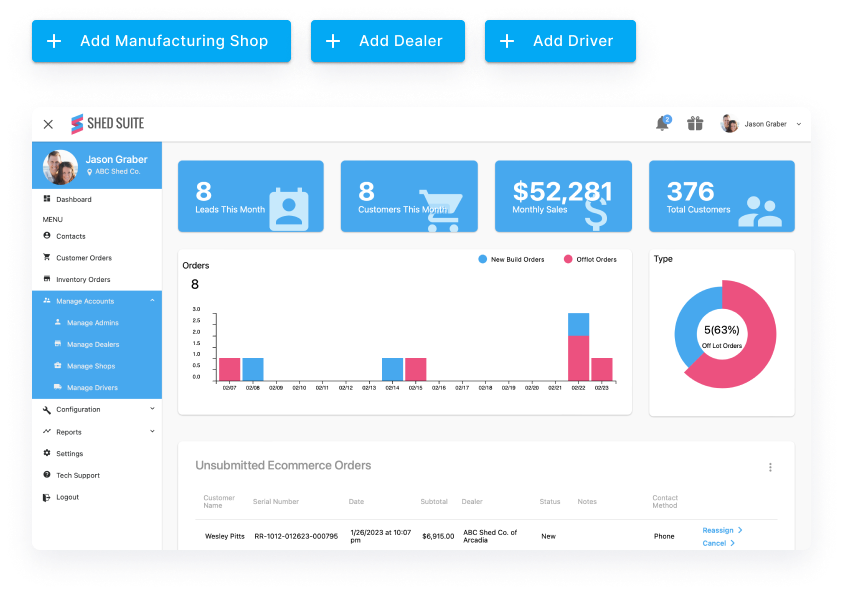
The heart of Shed Suite gives you real-time inventory management to track your products and stock levels. You can replace your paper forms with online orders and better tracking systems. The Material Requirements Planning (MRP) system helps speed up manufacturing by figuring out what materials you need based on what customers want.
3D shed configurator and design tools
The system works smoothly with IdeaRoom 3D Builder so customers can design their own sheds or pick from ready-made models. Buyers can see their designs come to life, which helps close more sales. Your customers get creative freedom while you keep control of what options they can choose.
Lead tracking and CRM features
Shed Suite makes lead management simple with everything in one place. The Admin Dashboard lets you check lead status, write notes, send quotes, and handle follow-up emails. The CRM system automatically responds to customers and follows up to keep them involved throughout their buying experience.
E-commerce and dealer websites
You can build Google-friendly dealer websites to boost your online presence. The e-commerce part lets you show and sell your inventory online with safe payment processing. Dealers can make their listings unique with custom titles, descriptions, unlimited photos, and YouTube video links.
Delivery scheduling and driver dashboards
Different roles get their own special dashboards, including delivery drivers. The delivery system finds the best routes, tracks deliveries live, and captures delivery proof. This makes communication easier between your shop yard, office, dealer lots, and drivers.
Advanced reporting and analytics
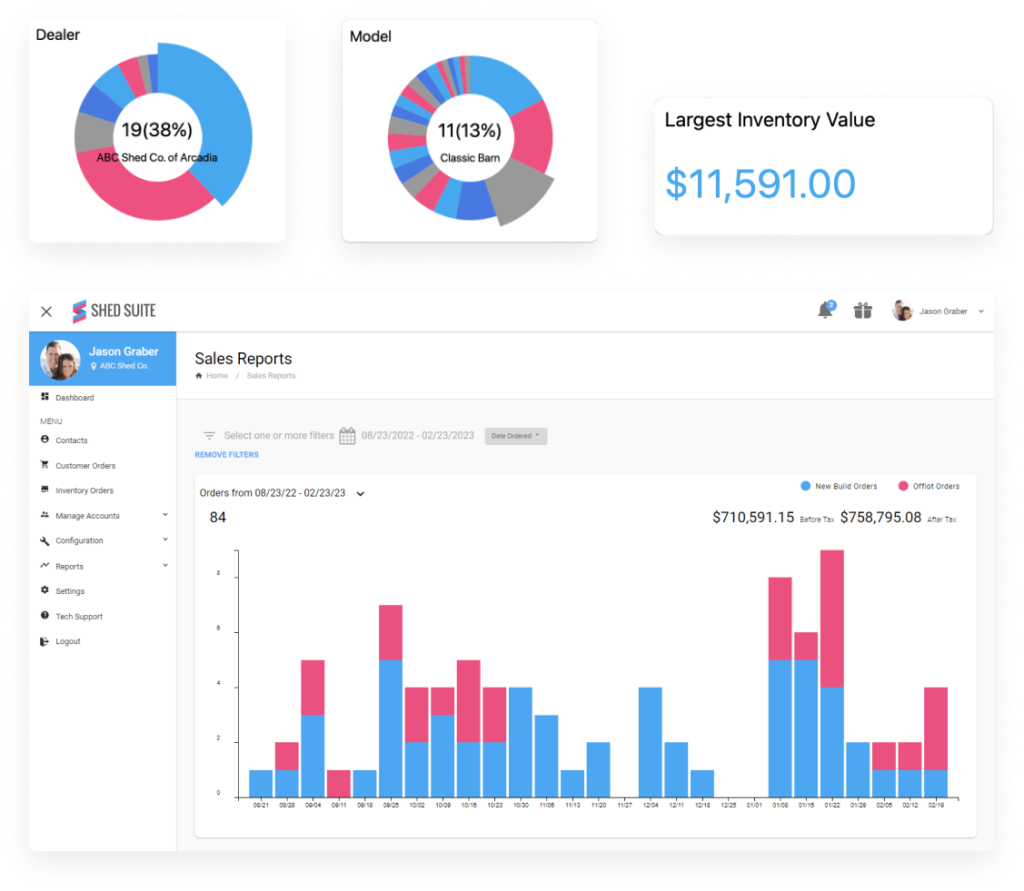
You get detailed reports about sales, shop builds, and deliveries. Shed Suite also connects with Google Analytics so you can track how well your website performs, understand customer behavior, and measure marketing results.
Shed Suite Pricing
Shed Suite doesn’t sell feature tiers. Every customer gets the full platform, and pricing scales with the size of your business. According to Shed Suite’s pricing page, there are three parts to the cost:
- Platform fee: $300 per month, covering unlimited users.
- Service fee: a monthly fee based on your annual order volume, so smaller operations pay less.
- Setup: a $1,000 one-on-one setup fee, which is waived if you pay the platform fee yearly.
As an example, Shed Suite’s own pricing estimator shows a business doing $10 million in annual sales paying a $1,750 monthly service fee, which comes to $2,050 a month and $25,600 for the first year when billed monthly. Paying yearly would save that business $1,600 in year one. Optional CRM and marketing services are the only extra-cost products. Pricing can change, so plug your own volume into the estimator or book a demo for a quote.
Shed Suite Pros and Cons
Pros
- Built by people from the shed industry, specifically for shed manufacturers and dealers.
- One platform covers dealer websites, e-commerce, 3D builder integration, leads, inventory, contracts, payments, and delivery.
- Unlimited users, and no features locked behind higher-priced tiers.
- Browser-based, so dealers, drivers, and office staff can work from anywhere.
- A large user base: Shed Suite reports more than 2,800 shed businesses and over 400,000 sheds delivered through the platform.
Cons
- The service fee rises with your sales volume, so your bill grows as your business does.
- A $1,000 setup fee applies if you pay monthly.
- CRM and marketing services cost extra.
- The $300 monthly platform fee can be a lot for a small or part-time builder.
- It’s built for the shed and portable building industry, so it isn’t a fit for general contractors.
How Shed Suite Compares to Other Tools
The shed business software market has several competitors competing for attention. Let’s get into how Shed Suite compares to its main rivals.
Shed Suite vs ShedVerse
ShedVerse aims to eliminate repetitive tasks and improve cross-departmental communication. The platform offers customizable features built on the Jarvis CRM platform. Shed Suite takes a different approach with a broader feature set that includes dynamic inventory management, e-commerce capabilities, and specialized dashboards.
Shed Suite vs Sheds Software
Sheds Software comes in two versions: Sheds Retail for small operations and Manufacturer Module for larger businesses. While Shed Suite runs in browsers, Sheds Software needs remote desktop or local installation. Sheds Software integrates with QuickBooks and imports orders from various configurators.
Shed Suite vs The Shed App
The Shed App provides a complete platform with 3D design tools and strong reporting features. Though similar, Shed Suite’s IdeaRoom 3D Builder integration and specialized role dashboards make it stand out in user experience.
Shed Suite vs ShedPro
Shed Suite and ShedPro are both popular shed-business software platforms, but they shine in different areas. Shed Suite focuses on complete backend operations—quoting, orders, inventory, delivery, payments, and dealer management—making it ideal for builders who want an all-in-one system to run their entire business. ShedPro leans more toward sales and customer experience, offering a polished 3D configurator, marketing tools, and an online buying flow designed to generate and convert more leads. In short, Shed Suite excels at operational efficiency, while ShedPro stands out for customer-facing sales and customization.
When to choose an all-in-one vs individual tools
All-in-one solutions like Shed Suite create simplified processes by combining multiple functions. Individual tools excel at specific tasks with deeper customization options. Your business size, budget limits, and balance between convenience and specialized features should guide your choice. Take time to review any vendor’s track record. You might want to ask for customer references to check satisfaction levels.

Getting Started with Shed Suite
Your shed business starts an exciting journey with Shed Suite. The platform helps your team get up and running fast with a practical approach.
Implementation and setup process
A full-service onboarding team guides you through setup, whatever your specific needs. Your team will set up user accounts for different roles like dealers, sales reps, and shop administrators. The system helps you establish building models, set up pricing, and configure addon categories before you move to inventory management.
Training your team effectively
Shed Suite offers detailed role-specific training videos that cover every position. These resources train you first and give you tools to train your staff. The training videos show you everything from account overviews to inventory management, quote creation, and sales reporting.
Support and customer service experience
The platform provides unique support through a well-stocked article and video help desk. Your team can reach out to support staff through the support desk with questions, feature requests, and feedback.
Scalability and future updates
Because Shed Suite doesn’t lock features behind higher tiers, you won’t need to switch plans as you add users, dealers, or locations. Shannon from Legacy Sheds shares, “I’ve seen zero hiccups, zero restraints from Shed Suite as we’ve scaled”. Darren from Stor-Mor adds, “If you want to scale your business and you want to grow, you need Shed Suite”. The development team makes continuous improvements to keep your investment valuable for years.
Conclusion
The right software can make your shed business run better and optimize your daily work. Shed Suite tackles common industry problems with solutions that work. You won’t need multiple tools anymore. This platform handles everything from inventory to delivery in one place.
Shed Suite really shines because it gets what shed businesses need. Their features cover all the bases. You get up-to-the-minute inventory tracking and 3D tools that help customers design their dream sheds. On top of that, it packs CRM features, connects to online stores, and has special dashboards that keep your team talking.
Other platforms have good products too, and the right choice depends on your size and priorities. For a side-by-side look, see our ShedSuite vs ShedPro vs TheShedApp comparison. Where Shed Suite stands out is depth: its tools work together across every role, and because no features are locked behind higher tiers, you won’t outgrow the platform. Just budget for a service fee that rises as your sales volume grows.
The team at Shed Suite makes getting started easy. They help you learn the ropes and provide detailed training materials. Regular updates and solid support keep your investment working well for years.
Shed businesses that don’t deal very well with messy processes or want to grow smoothly should take a look at Shed Suite. Each business has its own needs, but this platform’s focus on sheds makes it a great choice if you want to run everything through one system.
FAQs
Q1. How user-friendly is Shed Suite for managing shed sales? Shed Suite offers a streamlined approach to shed sales with dynamic online order forms and advanced tracking features. This eliminates the need for paper forms or PDFs, making the sales process more efficient and organized.
Q2. Does Shed Suite include 3D design capabilities for sheds? Yes, Shed Suite integrates with IdeaRoom 3D Builder, allowing customers to design custom sheds or choose pre-configured models. This feature enables buyers to visualize their creations in real-time, potentially boosting sales conversions.
Q3. What are some alternatives to Shed Suite? While Shed Suite is tailored for the shed industry, alternatives include Deltek Vantagepoint, Jobber, FieldPulse, Unanet CRM by Cosential, and Housecall Pro. However, these may not offer the same level of industry-specific features as Shed Suite.
Q4. How does Shed Suite ensure data security? Shed Suite prioritizes security by maintaining PCI compliance and not storing card information on its servers. It also utilizes Verisign, an independent third-party company, for authentication of Internet services and digital identity protection.
Q5. Can Shed Suite accommodate business growth? Yes, Shed Suite is designed to scale alongside your business without requiring costly upgrades. Users have reported no constraints or hiccups as their businesses have grown, making it a suitable solution for shed businesses looking to expand their operations.
Q6. How much does Shed Suite cost? Shed Suite charges a $300 monthly platform fee for unlimited users, plus a monthly service fee based on your annual sales volume. There’s also a $1,000 one-on-one setup fee, which is waived if you pay the platform fee yearly. Every customer gets the full feature set; only the optional CRM and marketing services cost extra.
Q7. Who makes Shed Suite? Shed Suite was founded by Jason Graber, who came from the shed industry, and the company is based in Sarasota, Florida. It reports that more than 2,800 shed businesses use the platform.